Getting Started in Pocket Pilots
From home airport to first paid landing — your Skylark career begins here.
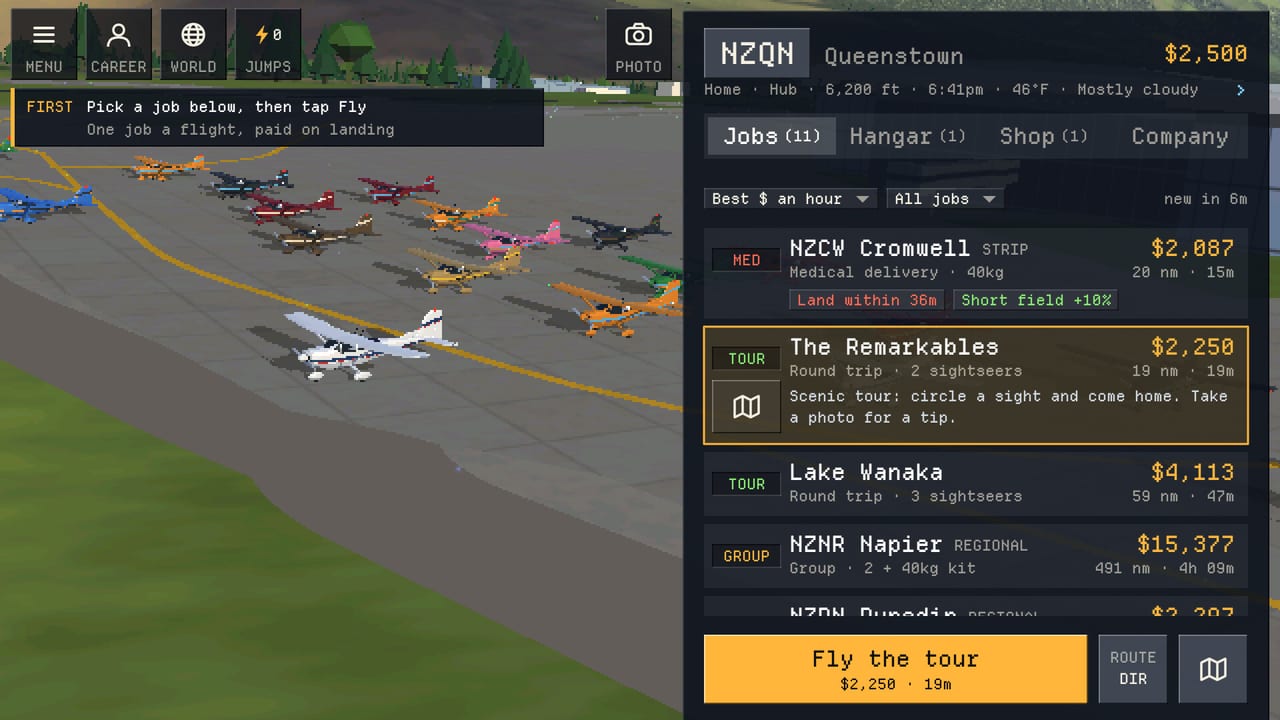
Pocket Pilots drops you into a real-world flight career with a light Skylark, $2,500 in the bank, and a home airport you pick yourself. The loop is simple to learn and rich to master: choose a job, watch the plane fly over live weather and real terrain, collect pay on landing, then grow licenses and the fleet. This guide gets a new career airborne cleanly on Steam, Android, iOS, or the browser.
Sign in and protect the career
Before you burn hours into a hangar you like, sign in. Steam on PC, or Apple / Google on mobile and browser, keeps one career synced across devices. Cross-play means the plane you parked in San Diego on your phone is waiting when you open Steam later. Free-to-play progression is generous; optional purchases (jumps, liveries, Pilots Club) never replace the core loop of flying jobs for cash.
Choose a home airport
Your first airport is a strategic choice. San Diego offers dense coastal traffic and famous photo targets nearby. Queenstown puts you in dramatic alpine New Zealand scenery for scenic tours. The Swiss Alps deliver mountain weather and postcard routes. You can also start at thousands of other real airfields if you already have a favorite strip.
Pick a region you enjoy looking at — you will spend a lot of time watching approaches — and one with a healthy job board of short charters and scenic hops. Early careers thrive on frequent landings more than epic ocean crossings. Short legs keep the Skylark busy, fill the logbook, and turn $2,500 into upgrade money without long idle waits.
Meet the Skylark
The starter Skylark cruises around 122 knots. It is honest, forgiving, and perfect for learning the job board, taxi flow, and camera controls. Name it, paint it when you unlock cosmetics, and treat early flights as practice for reading weather, daylight, and ETA. Selling the Skylark later can recover a chunk of cash (players often see recovery in the tens of thousands when stepping up), but keep it until the next purchase is funded and licensed.
Your first jobs
Open the job board at your home field. You will see charters (passengers with a destination), scenic tours (sightseeing loops that pay for the view), and cargo (weight and schedule focused). Load a job that matches the Skylark’s seats and range, confirm the route on the map, and launch.
Flights take real time. A short regional hop may finish while you watch; a longer leg can run while you do something else. Pocket Pilots is built for that rhythm: set a flight, return when the progress bar shows landing, collect pay, and queue the next one. Night landings happen when a late flight pushes past sunset — the world clock is live.
Watch, photograph, and tip
During cruise, explore cameras and the map. Famous sights along the route can be snapped for tip money. Early tips are small but teach you which corridors are photogenic. Pair scenic tours with known landmarks when you can; the Make Money guide goes deeper on maximizing those extras.
Check the flight progress bar for climb, cruise, descent, and stops. Learning to read that bar helps you time when to open the game for approach and landing without staring at every minute of cruise.
After the first landings
Build a habit:
- Land, collect pay, review the logbook entry.
- Scan the board for the next high-value short job the Skylark can take.
- Note license progress — bush, twin, turboprop, jet, helicopter, and related ratings unlock bigger airframes. See Licenses.
- Bank cash toward a speed upgrade. Many pilots aim for the Swallow (~$95,000, ~172 knots) as the first serious buy; compare it with the Bushmaster in Buying Planes.
Companies and the shared sky
You are never alone upstairs. Other pilots share the same world. When you are ready for shared hangars and big charters, create or join a company. Invite codes (example format: 6HC9TV) let friends sync into the same operation. Weekly world events give everyone a rotating goal. Details live in Companies.
Controls cheat sheet
If the interface feels crowded, jump to Controls for job board filters, map search, flight watch, photo capture, and jumps (teleport you and your plane to another airport when you want to reposition instantly). Jumps are optional IAP; organic flying always works.
First-week goals
Aim for a clear first-week checklist:
- Sign in on every device you use.
- Complete a mix of charter, scenic, and cargo so you understand payout shapes.
- Snap several landmark photos for tips.
- Reach a savings target toward your next aircraft while tracking license requirements.
- Join a company or bookmark an invite for when friends are ready.
- Sample a helicopter pad job later once ratings allow — see Helicopters.
Platforms and where to play
Play in the browser at the official NimbleBit pilots site, install on Android or iOS, or launch from Steam (Steam release dated November 17, 2026, with mobile available earlier). System needs on PC are light; the experience is designed around relaxed sessions and real-time flight duration rather than twitch controls.
What to read next
Chain this page into Make Money for payout strategy, then Buying Planes when the hangar fund is ready. Keep Licenses open as a checklist, and return to the Guides Hub whenever you need the full map of walkthroughs. Check Updates after patches that add aircraft families or map features.
Your career starts small on purpose. Master short Skylark legs, enjoy the real terrain and live weather, and let cash and licenses open the next hangar door at a pace that fits real life.
Frequently Asked Questions
Quick answers for Pocket Pilots careers, fleets, and companies.
How much money and what plane do I start with?
Every new career begins with a Skylark and $2,500 at the home airport you choose.
Which home airport should a beginner pick?
Choose a region you enjoy watching and that offers frequent short jobs — San Diego, Queenstown, and the Swiss Alps are popular starting areas among thousands of real fields.
Do I need to watch every flight the whole way?
Flights continue in real time while you are away. Watch approaches and photo moments when you like, then return for landing pay.
How do I keep progress on phone and PC?
Sign in with Steam, Apple, or Google so one career syncs across Steam, mobile, and browser.
What should I save for after the Skylark?
Many pilots save toward the Swallow for a clear speed bump; compare options in the Buying Planes guide before you sell the starter.